
Paper vs Digital Worksheets: Which Is Better for Schools?
Paper worksheets are familiar, dependable and quick to hand out. Most departments have built up trusted resources over years, and there's nothing wrong with a well-designed worksheet. The worksheet itself is rarely the problem. The time goes on what happens after it: the photocopying, the marking and the chasing of who understood and who didn't. That is also where progress becomes hard to see across a class, let alone a department. This article weighs both sides for heads of department, school leaders and IT or admin teams.
Where paper still wins
Paper has real advantages, so any fair comparison starts with them.
Paper needs no devices, no logins and no wifi. You can put a worksheet in front of 30 students in seconds, and it works the same whether you have one laptop trolley or none. For schools with limited hardware, that simplicity is the difference between a lesson that runs and one that stalls while devices sign in.
Paper is also distraction-free in a way screens aren't: no tabs to switch to, no battery to run flat, no software update at the worst moment. Younger pupils and those still building handwriting benefit from the physical act of writing. And anyone can use it: a supply teacher needs no training at all.
If your context is patchy connectivity, shared or scarce devices, or a strong preference for handwriting, paper remains a sensible default for plenty of tasks. A digital tool has to earn its place.
Where digital pulls ahead
The case for digital is strongest where paper struggles: the workflow around the worksheet rather than the worksheet itself. With a tool like ClassKite, the gains fall into five areas:
- Instant feedback. Objective questions (multiple choice, true/false, fill-in-the-blank, matching and jumbled sentence) are marked the moment a student submits, so a pupil knows straight away whether they're on track instead of waiting days for a marked sheet.
- Live visibility. The Live Student Grid (on Teacher Plus and School plans) shows real-time status as students work: who has started, who's making progress, who has raised a one-tap help flag, and a "struggling" signal when answers are repeatedly wrong. You see the room at a glance instead of circulating blind.
- No photocopying. No print run, no jammed copier before period one, no stack of sheets to collect and carry home.
- Consistency across a department. A teacher can copy a class's topics, PDFs and questions into each of their other classes, and colleagues can import the same question spreadsheet, so classes work from the same version instead of three slightly different photocopies of one task.
- Progress data you can use. Reports (Plus and School) give per-session completion, average score, right first time and solved, plus a row for every student, a sessions log, a score-trend chart and CSV export. A practice the whole class found hard stands out at once. (ClassKite reports the numbers; it doesn't produce an automated "learning-gap analysis" or tell you what to do next.)
None of this means abandoning what you already have, which leads to the position most schools end up in.
The hybrid reality
The choice is rarely "paper or screens" in the absolute. The practical middle ground is to keep your trusted resources and make those interactive.
ClassKite shows your existing PDFs exactly as they'd print and adds the interactive layer on top, so you don't rebuild a single worksheet. A teacher can annotate live over the page with a plain pen, calligraphy ink, a highlighter, shapes and sticky notes, scroll continuously and zoom in. If the connection drops, the annotations wait on the device and are sent when it is back. The same file can then drive live practice where students answer on their own devices. You keep the materials your department trusts; what changes is what they let you see and do.
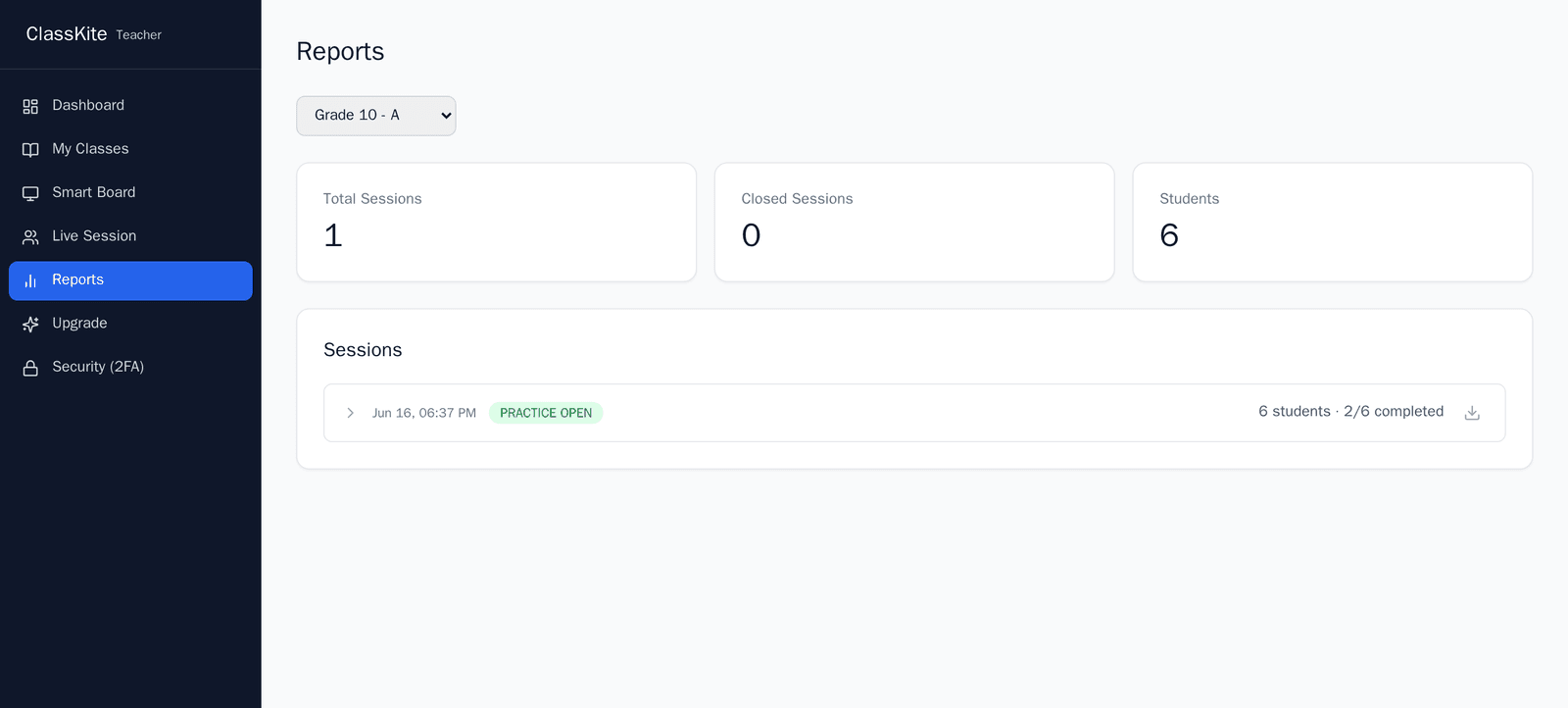
For a department, hybrid often means paper for quick, low-stakes or handwriting-heavy tasks, and digital where instant feedback, live visibility or a record of progress helps. For more on turning an existing file into practice, see our guide on how to create digital practice from a PDF.
Questions to ask before switching
Test the decision against your own school's circumstances. A short checklist for a head of department or leadership team:
- Devices. Do students have access to devices when they'd need them: one each, shared sets or bring-your-own? Where there are none, paper still wins for that task.
- Connectivity. Is your wifi reliable in the rooms that matter? (Annotations wait on the device if it drops, but students answering practice need a working connection.)
- Teacher buy-in. Will staff use it? A tool that works with existing worksheets is far easier to adopt than one that demands new materials.
- Data and privacy. Are you comfortable with how student data is handled, and can you explain it to parents and governors?
- Cost model. Does the pricing match how you're organised (by department, by year group or whole-school), and is the billing simple to administer?
- Rollout. Can you start with one group and expand, rather than committing the whole school on day one?
If most answers are positive for at least some of your teaching, a focused trial is reasonable. If several are shaky, fix those first.
Cost and rollout
For schools, ClassKite is billed per seat in blocks of 15, monthly or annually (the annual option is discounted), as one subscription for the whole school, paid through PayPal. Students are free: they join a class with its join code and never need a paid account, so your seats cover teaching staff, not pupils.
Rollout doesn't have to be all-or-nothing. A common pattern is to start with one department, run it for a half-term and expand from there. Bulk Excel import brings in teachers, classes and rosters without manual data entry, and the admin console handles seats and roles, with role-based access for students, teachers, school admins and a super admin. Because everything runs in the browser on smart boards, laptops and tablets, there's nothing to install or maintain on each device. Full details are on the schools page and in our pricing overview.
What this means for a school
At school level, the case for hybrid comes down to four things: consistent resources reused from class to class rather than diverging photocopies; live insight into who's struggling while the lesson is still happening; time back from photocopying and from auto-scored objective questions; and a single place to manage seats, roles, classes and reports. What changes is the workflow; years of resources stay in use. If reducing the marking burden is a particular pressure, our note on how to reduce marking time goes into more detail.
In the classroom
Take a science department preparing a topic test. They upload an existing revision PDF as it is and add a short set of multiple-choice and number questions, which are marked on submission. During the lesson, the teacher watches the Live Student Grid: two pupils raise help flags, and three are flagged as struggling on the same balancing-equations question. The teacher pauses, reteaches that one idea on the smart board, and moves on. Afterwards, the report shows the class average and how much each student got right first time, which is useful evidence for the next department meeting, exported to CSV if needed. The worksheet was familiar; what changed was the visibility around it.
Frequently asked questions
Do students need devices and logins?
For practice, yes: students answer on their own devices. They sign up with your class's join code and never need a paid account, which keeps sign-in simple. Where devices are scarce, you can still use ClassKite on the smart board for teaching and annotation, and keep paper for tasks that don't need a screen.
Can we keep our existing worksheets?
Yes. You upload them as PDFs, annotate them in class and build practice alongside them, so nothing has to be recreated.
How is student data handled?
Connections use HTTPS, passwords are salted and hashed, sign-in is rate-limited, and access is role-based. Data runs on EU infrastructure, and we don't sell personal data or carry third-party ads. You can read more on our trust page; for specific procurement or data questions, get in touch.
Can we start with one department?
Yes, and it's the approach we recommend. Seats are bought in blocks of 15, so a single department can start on its own; bulk import and the admin console then add more teachers and classes when you expand.
Talk to us
If you're weighing paper against digital for your school, the most useful next step is a conversation about your devices, your connectivity and how your departments are organised. Book a school demo, explore what's included for schools, and review the options on our pricing page. If you're new to the platform, what is ClassKite? is a good place to start.
Written by the ClassKite team and reviewed by a practising teacher.