
How to Reduce Marking Time as a Teacher
Marking is the tax you pay after every lesson. You plan the lesson, teach it and set the practice, then, usually late in the evening, sit down with a stack of books to find out what landed. It works, but it's the slowest way to learn what your class understood: by the time you reach the bottom of the pile, the moment to act has passed. This article is about marking less without learning less, and spending the time you save where your judgement matters.
The real cost of marking
The obvious cost is the hours: evenings, weekends, the free period meant for something else. The hidden cost is bigger, because marking is feedback delayed. When a class sits work on Monday and gets it back on Thursday, the gap between mistake and correction is days wide. Misconceptions have set, and the lesson that could have fixed them has already gone.
Consistency suffers too. A long session is tiring, and tired marking drifts: the first script and the fortieth rarely get the same attention. Much of what you mark is also mechanical (right or wrong, B or C, is the total correct), and a computer does that work quickly and the same way every time.
Five ways to mark less
-
Auto-score the objective questions. Multiple choice, true/false, fill-in-the-blank, matching and jumbled-sentence questions have a single correct response, so there's no reason to mark them by hand. In a live ClassKite practice, students answer on their own devices and each answer is scored the moment it is submitted, with points awarded as they go. That part of the marking is finished before the lesson ends.
-
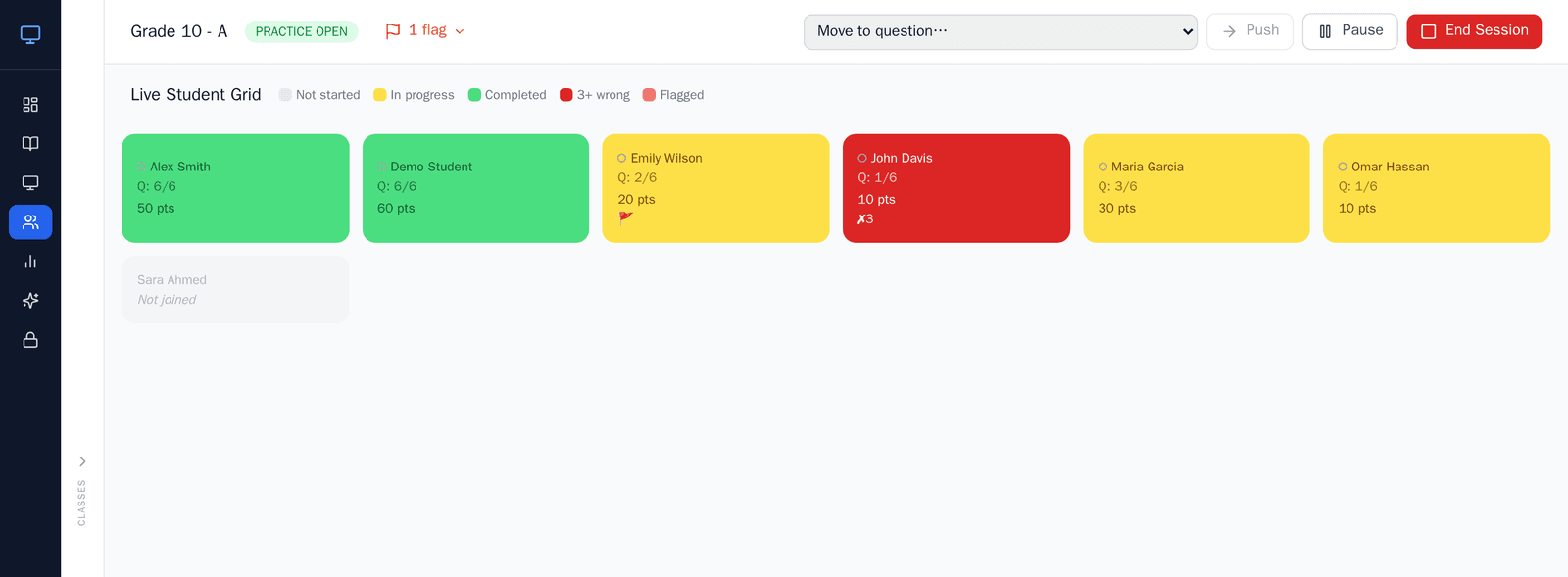
See mistakes live, while you can still act. The slow part of marking is finding out too late. With the Live Student Grid (Teacher Plus and School plans), you watch progress and scores update in real time, see who's raised a help flag, and get a "struggling" signal when a student gets the same question wrong three times. You're reading the class as it works, so a reteach happens in the lesson rather than in a comment they may never read.
-
Reserve your time for human-judgement work. Once ClassKite has scored the right/wrong questions, that time goes to the marking only a teacher can do: the extended answer, the reasoning, the working that's almost right. This is the marking that changes how a student thinks, and with the ticking done you can give it your full attention.
-
Reuse scored practice instead of rebuilding it. A practice you've built and run stays in your account. Assign the same set to another class, to next year's cohort, or as revision, and the objective questions score themselves again with no extra marking. You author once; the saving repeats every time you reuse it. The same goes for uploaded PDFs (slides included, once exported to PDF), which stay reusable across classes.
-
Let reports do the summarising. After a session you usually need a summary: who completed it, the class average, who needs another go. ClassKite reports (Teacher Plus and School plans) show each session's completion, average score, First try and Solved, plus a row for every student, a sessions log, a score trend and CSV export. They do the tallying for you. They don't analyse learning gaps; they lay out the figures so you can draw the conclusions quickly.
What to auto-mark and what to keep for yourself
The decision is simpler than it sounds: auto-mark anything with one defensible correct answer, and keep anything that needs a teacher's judgement.
Hand ClassKite the multiple-choice questions, the numeric calculations, the short factual recall and the fill-in-the-blank items, including those with LaTeX maths. They're scored the same way every time, the moment the student answers.
Keep for yourself the extended writing, the open reasoning, the multi-step problem where the method matters as much as the answer, and anything where a "wrong" final answer might still contain good thinking worth crediting. ClassKite has no open-ended or extended-response questions, by design, so that writing stays on paper or wherever you mark it now. A rule of thumb: if you could write a single key that any colleague would mark identically, automate it; if marking it well needs your professional judgement, it stays with you.
The same line applies when you build questions with the AI question generator. You give it a topic, a count and a difficulty; it drafts multiple-choice and fill-in-the-blank questions; then you review and edit every one before it's assigned. Nothing is assigned automatically, and the AI never marks student work. It gives you a faster start on the questions that will later score themselves.
Before and after
Before: you set a worksheet, collect it in, and carry it home. You mark every question by hand, including the forty multiple-choice items that only needed a tick or a cross. You spot a recurring misconception around the middle of the pile, too late to do much before the next lesson. You write a markbook summary by counting up totals yourself.
After: students complete the practice on their devices, and the objective questions are scored as they go. You watch the Live Student Grid and reteach the tricky idea on the spot, while it still matters. At home, you mark only the extended answers on paper, the work that needs you. The session report has already tallied completion, First try and Solved, so your summary takes a glance rather than a sum.
The common mistake: don't auto-mark everything
The trap is treating automation as the goal rather than the tool. Once auto-scoring is saving you time, it's tempting to convert every question into multiple choice so nothing's left to mark by hand. Resist it. Open reasoning, justification and extended writing are where a lot of real learning shows up, and forcing them into a tick-box format quietly narrows what you're assessing.
Use auto-marking to clear the mechanical work and keep the thoughtful marking for yourself. The goal is less time ticking and more time on the feedback a student will act on.
In the classroom
Take a science teacher running an end-of-topic check (an illustrative example). She builds a practice of 15 questions (multiple choice on key terms and a few numeric calculations) and sets two extended "explain why" questions on paper, since ClassKite has no written-answer questions. She drafts the objective items with the AI generator, edits two that are too easy, and assigns the set.
During the lesson she watches the Live Student Grid. Three students raise help flags on the same calculation, and the grid marks two more as struggling on it. She pauses, works it through on the board, and the class moves on. By the time the bell goes, every objective question is already scored. That evening her marking is two short explanations per student and nothing else. The session report gives her completion and a score for every student, and the help flags have already told her which calculation to revisit next lesson.
Frequently asked questions
What can be marked automatically?
Objective questions with a single correct answer: multiple choice, true/false, fill-in-the-blank (a word or a number), matching and jumbled-sentence items, including those using LaTeX maths. These are scored instantly during a live practice, with points awarded as students submit.
Does ClassKite mark essays?
No. ClassKite has no essay or written-answer questions, so extended writing stays with you, on paper or wherever you mark it now. ClassKite handles the mechanical marking so you have time to give the writing and reasoning the attention they need.
How do I give feedback faster without auto-marking everything?
Use the live view. The Live Student Grid surfaces help flags and a "struggling" signal as students work, so you can step in during the lesson instead of writing comments after it. For the work you do mark by hand, the auto-scored questions are already done, so your time goes entirely to the answers that need judgement. There's more in our guide to tracking student progress during live practice.
Which plan includes live reports?
The Live Student Grid and reports are available on Teacher Plus and School plans; students always join free with a join code. Compare what's included on the pricing page, and schools can read about per-seat billing and the admin console on the schools page.
Mark less, teach more
Reducing marking time means putting your attention where it counts. Let the objective questions score themselves, read your class live while you can still act, and keep your marking for the work that needs a teacher. To try it with your own questions, sign in and build a practice, and see the pricing page for the plans that include live reports. If you're weighing it up for a department, read how ClassKite saves teachers time or get in touch.
Written by the ClassKite team and reviewed by a practising teacher.