
How ClassKite Saves Teachers' Time

Ask a teacher where their time goes and you'll hear the same answers: preparing materials, photocopying, and marking. ClassKite is built to give that time back — not by adding another tool to manage, but by making the materials you already use do more. Here's exactly where the hours come back.
1. Stop rebuilding — start from your PDFs
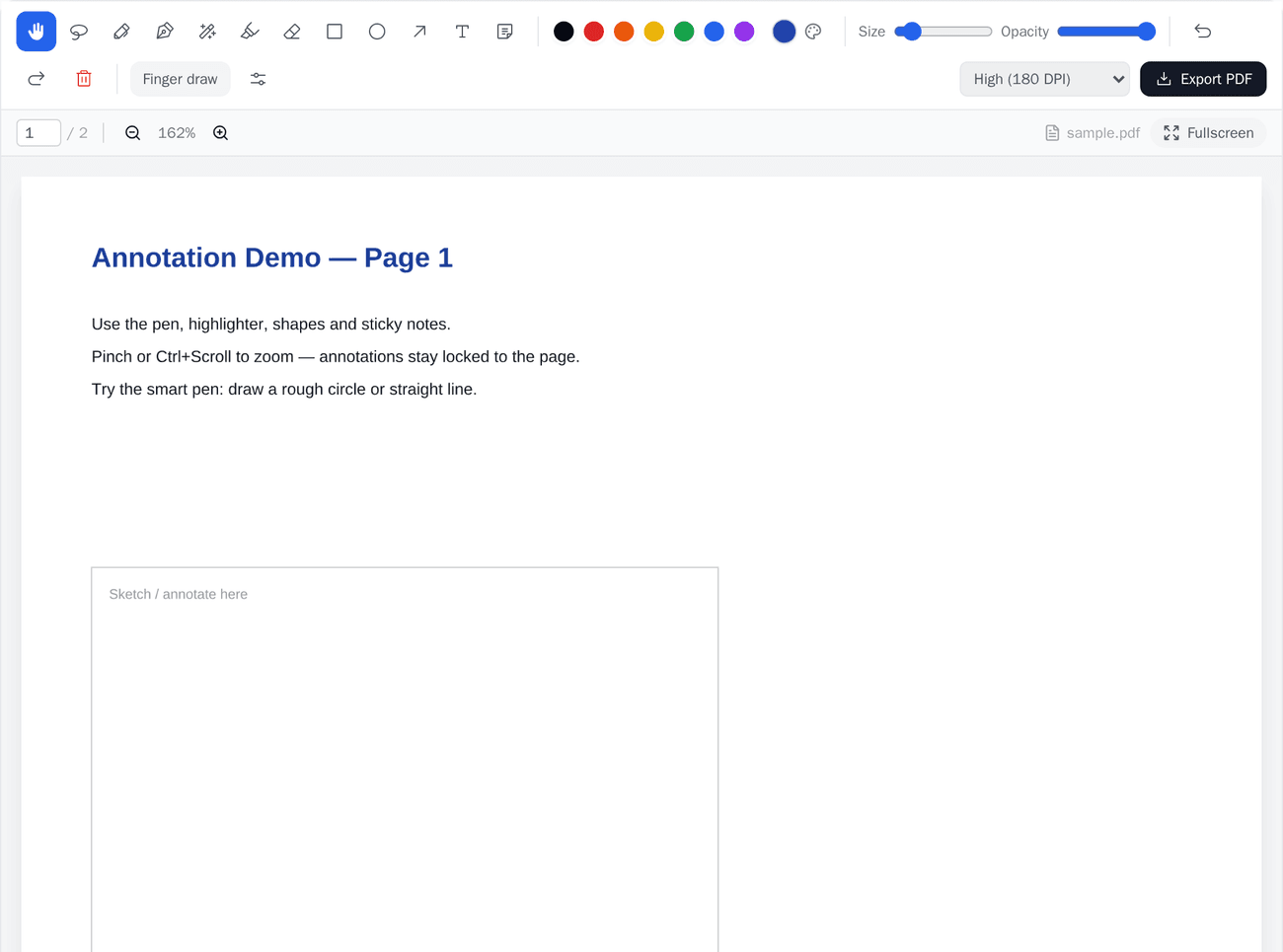
You don't need to recreate your worksheets in a new format. Upload the PDF you already teach from, and add questions directly on top of it. The page students see is your original material; the interactivity is layered on. Setup that used to take an evening takes a few minutes.
2. Let practice mark itself
Objective questions — multiple choice, numeric, short answer — are scored the instant a student answers. That's the routine marking that eats your evenings, gone. You keep your attention for the extended answers where a teacher's judgement actually matters.
Create your first class free and see scoring happen live.
3. See the class in real time
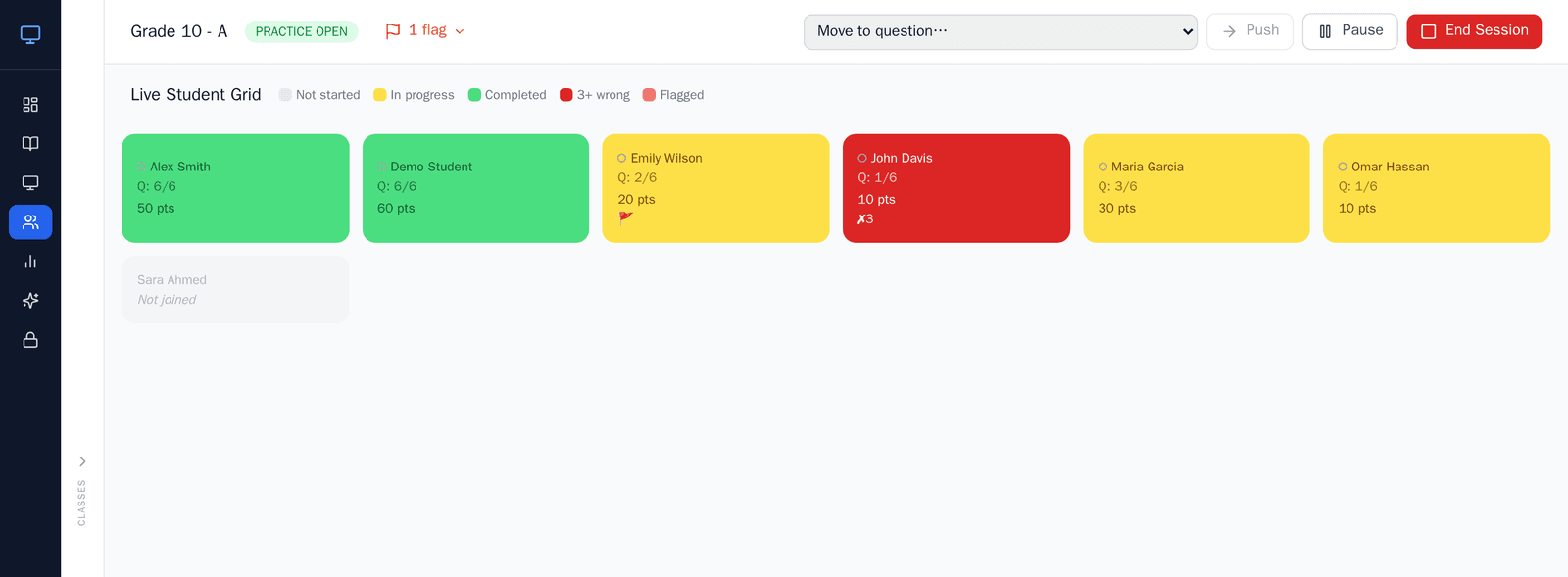
During a live session, the student grid shows who's done, who's stuck, and who's flagged for help — while the lesson is still happening. Instead of discovering a shared mistake while marking that night, you catch it in the moment and reteach it once, for everyone. (Live grid and reports are on Teacher Plus and School.)
4. Build once, reuse everywhere
A PDF set up with questions runs with every class you teach, this week and next year. No re-photocopying, no re-preparing. The first setup is the only setup.
Before and after
Before: prep the worksheet, photocopy 30 of them, teach, collect, mark in the evening, find the common mistake too late.
After: upload once, teach from the same pages live, watch scoring and progress in real time, and walk out with your evening intact.
A common mistake to avoid
Teachers often try to digitise everything at once. Start with one worksheet you teach every term — the time it saves on repeat use will pay for the setup many times over, and you'll learn the workflow on material you know cold.
Try ClassKite with one of your worksheets →
Set work without the photocopier
The time saved in the lesson is only half of it. Any practice you have built can be unlocked for students to do on their own — at home, in a cover lesson, or by whoever was absent — and it marks itself the same way. You are not collecting anything, and you are not carrying anything home.
Because it is the same practice, the results land in the same reports as your classwork. You open one view and see the class, not two piles.
Where it will not save you time
Worth saying plainly, because a tool that claims to save time everywhere usually saves it nowhere.
- The first setup is real work. Uploading a PDF and adding questions to it takes a sitting. It pays back on the second use, not the first — which is exactly why the advice below is to start with material you teach every year.
- Extended writing still needs you. Objective questions mark themselves. An essay, a method, a piece of reasoning does not, and should not — that judgement is the part of marking that is actually teaching.
- It does not plan your lesson. ClassKite has no lesson-plan generator. It takes the materials you have chosen and makes them go further; deciding what to teach stays with you.
What the first month usually looks like
- Week one: one worksheet, one class, taught live from the board. Nothing else changes.
- Week two: add three or four questions to that same PDF and run them as a five-minute check at the end.
- Week three: unlock the same practice for anyone who was away, and look at the report rather than the books.
- Week four: do it again with the next topic. By now the setup is fifteen minutes, not an evening.
Teachers who try to move a whole year's material in one go usually stall. Teachers who move one recurring worksheet almost always keep going.
Frequently asked questions
How long does it take to set up the first worksheet?
Plan on a sitting for the first one — uploading the PDF is quick, but writing good questions on top of it takes as long as writing good questions always has. The second and third are much faster, and a worksheet you teach every year only needs doing once.
Do I have to move everything across?
No, and it is a bad idea. Start with one worksheet you teach every term. You learn the workflow on material you already know cold, and the time saved on repeat use pays for the setup.
Does it mark written answers?
Objective questions — multiple choice, true/false, fill in the blank, matching — mark themselves on submit. Extended writing does not, deliberately. That is the marking where your judgement is the point.
What do students need?
A browser and a class code. Students always join free, with no per-student licence to buy or manage.
Written by the ClassKite team and reviewed by a practising teacher.
Teacher Basic is free and students always join free with a class code, so the workflow above can be tried with a real class before any spend. See what each plan includes.