
What Is ClassKite? A Classroom Teaching and Practice Platform

ClassKite brings your teaching materials, live lessons and practice into one place. You upload the PDFs you already use (slides too, once exported to PDF), present and annotate them on a smart board, generate practice questions with AI help (reviewing every one before it reaches a student), then send that practice to students, who join with your class's join code and answer on their own devices. Progress shows up as you teach, so you can see who's finished and who's stuck. Students never pay. Here's what ClassKite does, who it's for and how a lesson flows from start to finish.
Who ClassKite is for
ClassKite is built around a routine most teachers already have. If you prepare materials in advance, present at the front of the room and set practice to check understanding, it fits around what you do.
For teachers, it's a single workspace: upload materials, teach with them live, generate and assign practice, and watch responses come in. Students enter a join code, creating their account in the same step, and start answering on a phone, tablet or laptop, with nothing to install. Schools get one workflow across departments, plus the management tools that make a rollout across many classes practical: bulk import, an admin console and role-based access. There's more on the school side on the ClassKite for schools page.
The problems it solves
Most teachers run a patchwork of tools: a PDF viewer for the textbook, a slideshow app for presenting, a worksheet generator for practice, a messaging tool to send links, a spreadsheet to track who did what. Each works on its own, but the time goes on moving between them: re-uploading the same document, copying questions out, chasing missing answers, typing marks into a grid.
ClassKite replaces that patchwork. Materials, teaching and practice live in the same place, so the document you annotate on the board is the document you build practice from. Questions can be drafted with AI or imported from a spreadsheet instead of typed out one by one. Every question has a fixed correct answer, so responses are marked instantly and you're not deciphering handwriting at 9pm. And because responses arrive live, progress is visible while you can still do something about it.
What you can do with ClassKite
ClassKite comes down to five things, all working from the same materials.
Upload and annotate materials. Upload PDFs; every page renders exactly as it would print. Write over them live with a pen, a calligraphy ink tool for a handwritten feel, a highlighter and an eraser; drop in shapes (rectangle, ellipse, arrow), text boxes and sticky notes; scroll continuously through long documents; pinch or wheel to zoom. Annotations are kept on your device the moment you write them and saved to your ClassKite account automatically within a few minutes, or straight away when you press Save. If the connection drops, they wait on the device and are sent when it is back. See PDF annotation for more.
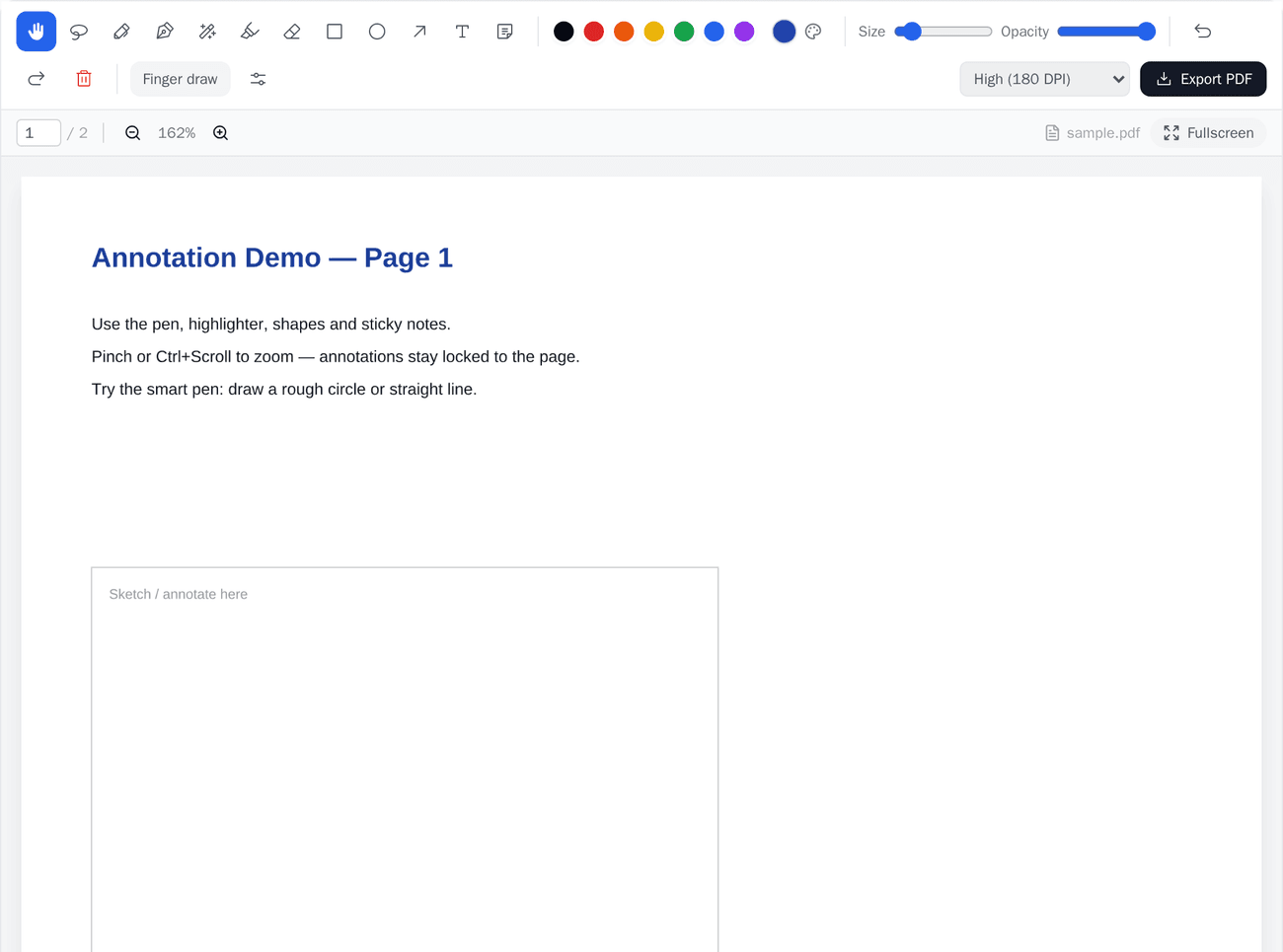
Teach with smart-board mode. Present any document full-screen and annotate as you go. With smart-board teaching, follow-me page sync keeps students' screens on the same page as yours, your strokes stream live to their devices, and you can push a single question, or a whole practice set, to the class mid-lesson.
Build practice three ways, then review it. Create questions whichever way suits you. Hand your own AI assistant the downloadable Question Bank template and your material, then import the questions it drafts in the template's format; use the built-in AI question generator, which drafts a set from a topic, a count and a difficulty; or write them yourself. You review and edit every question (wording, choices and the answer key) before anything is assigned. Nothing is assigned until you run it, and every answer is marked against the key you approved. The AI drafts multiple choice and fill-in-the-blank (word or number); questions you write or import can also be true/false, matching or jumbled sentence. LaTeX is supported for maths.
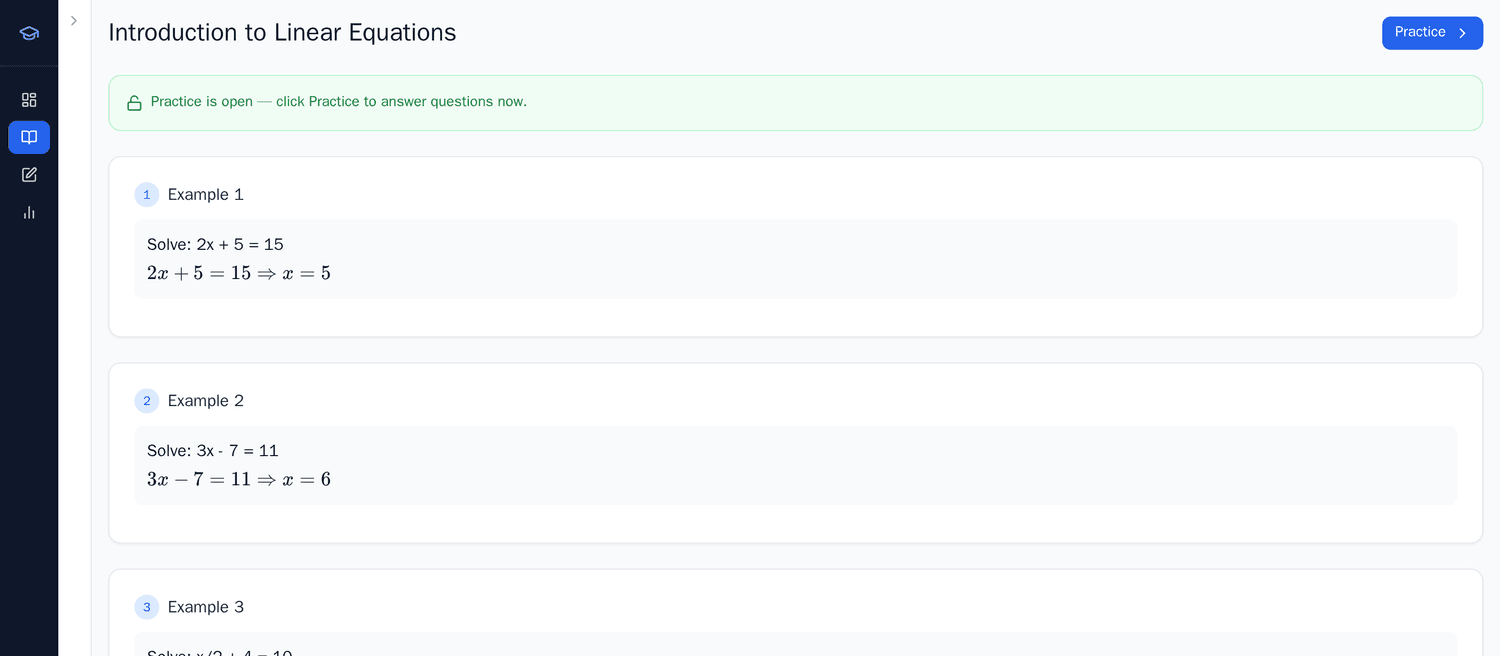
Send practice and watch responses. With live practice, students answer on their own devices and get instant right/wrong feedback and points. A one-tap help flag lets a student signal they're stuck, and you can run the practice live in the lesson, moving the whole class to a question when you want to, or set it as self-paced practice.
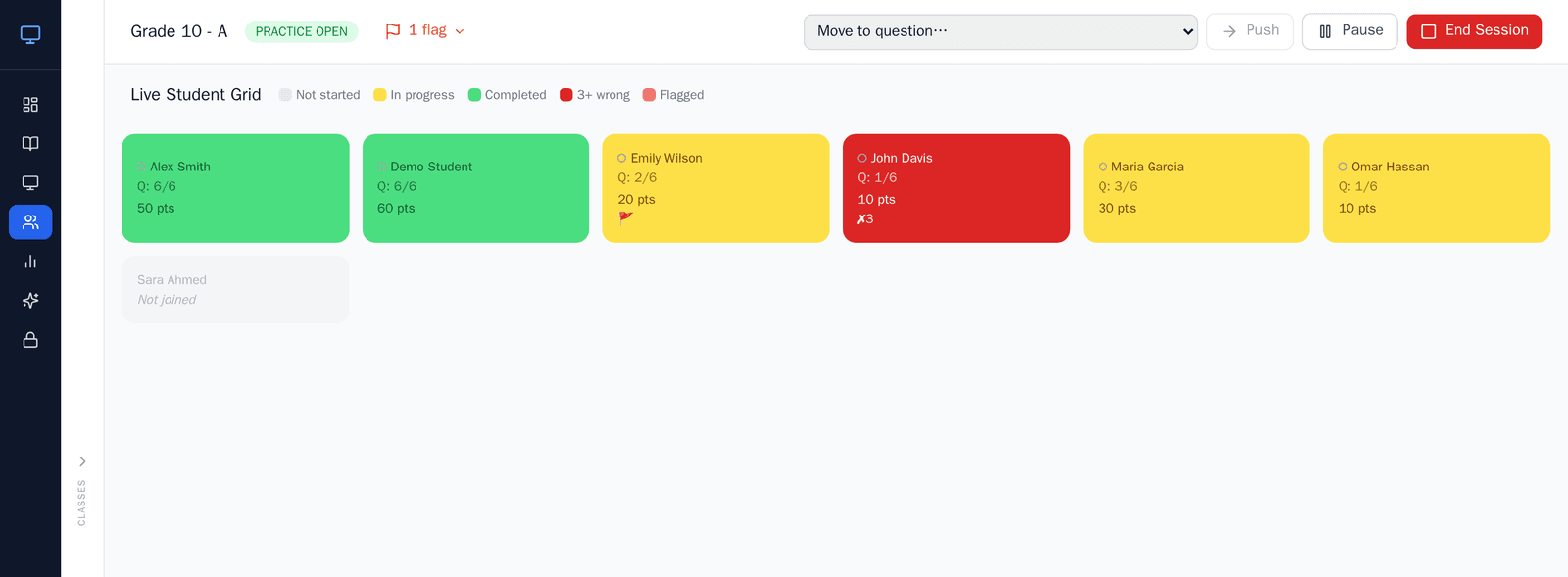
Monitor progress and review reports. On Teacher Plus and School plans, the Live Student Grid shows each student's status as it changes (in progress, completed or flagged), a "struggling" signal when a student keeps answering wrongly, their presence (Active, Away, Offline or Left), and questions completed plus score. Click any student to see their attempt history. Afterwards, reports give per-session completion, average score, right first time and solved, a row for every student, a sessions log, a score-trend chart and CSV export, and the Gradebook adds every practice up into an overall grade for each student, with report cards.
How a ClassKite lesson flows
A typical lesson moves through four stages.
- Prepare. Upload the PDF you're teaching from (export slides to PDF first), and optionally draft a few practice questions with AI, reviewing and editing each one.
- Teach. Open smart-board mode, present full-screen and annotate as you explain. Students' screens follow your page.
- Practise. Push a question or a whole set to the class. Students answer on their devices and see instant feedback.
- Review. Watch the Live Student Grid as answers arrive, then check the session report to see who understood and who needs another go.
For a fuller walkthrough, see how teachers use ClassKite, step by step.
Why it matters
The point is to give you back attention. Preparing a lesson takes less shuffling between apps. Practice stays organised, because the questions, the answers and the results all sit alongside the material they came from. And because progress shows as it happens, the students quietly falling behind show up too, while there's still time in the lesson to help them. ClassKite doesn't replace your judgement about what to teach or how; it removes some of the friction around it. For the practical version, our guides on saving time and reducing marking go into more detail.
ClassKite for schools
For a department or whole school, ClassKite adds the parts that make consistency manageable. Billing is per seat in blocks of 15, monthly or annually (annual is discounted), as one subscription for the school, paid through PayPal. You can bulk-import staff and classes from Excel, manage everyone from an admin console, open any class's Gradebook, set the school's grading policy and its school year and terms, and rely on role-based access for students, teachers, school admins and super admins. Students remain free. The schools page and pricing have the specifics, and paper versus digital worksheets is a useful read for leadership teams.
In the classroom
A Year 9 science teacher might export her photosynthesis slides to PDF, upload them, present them on the board and annotate the leaf diagram live as the class follows along. Near the end, she pushes a quick six-question check: a mix of multiple choice and fill-in-the-blank she drafted with AI and tidied up that morning. As students answer on their tablets, the Live Student Grid flags two who keep getting the role of chlorophyll wrong, so she pauses to re-explain before the bell. Afterwards, the session report shows which students got few questions right first time.
Frequently asked questions
Is ClassKite free for teachers?
You can create a teacher account and use the core tools at no cost. The Live Student Grid, Reports, the Gradebook and AI question drafting are part of the Teacher Plus and School plans. Compare what each tier includes on the pricing page.
Do students need an account?
Yes, a free one. Students create it when they first join your class with its code, or you import a class list and ClassKite creates the accounts for you. Students never pay.
What subjects does it work for?
Any subject where you teach from materials and set practice. It works from your own PDFs, and its question types (multiple choice, true/false, fill-in-the-blank with a word or number, matching and jumbled sentence, with LaTeX for maths) suit English, the sciences, languages, maths and more.
Is it for individual teachers or whole schools?
Both. An individual teacher can sign up and use it for their own classes, and a school can roll it out across departments with bulk import, an admin console and one subscription for the school. The for teachers and schools pages cover each route.
To try it, create a free teacher account and upload your first document; it takes a few minutes. School leaders looking at a wider rollout can find seat pricing and admin details on the ClassKite for schools page, or get in touch with any questions. How we handle data is set out on our trust page.
Written by the ClassKite team and reviewed by a practising teacher.